| 148 |
lars |
1 |
|
|
|
2 |
[<img src="https://github-ads.s3.eu-central-1.amazonaws.com/support-ukraine.svg?t=1" />](https://supportukrainenow.org)
|
|
|
3 |
|
|
|
4 |
# Ignition: a beautiful error page for PHP apps
|
|
|
5 |
|
|
|
6 |
[](https://packagist.org/packages/spatie/ignition)
|
|
|
7 |
[](https://github.com/spatie/ignition/actions/workflows/run-tests.yml)
|
|
|
8 |
[](https://github.com/spatie/ignition/actions/workflows/phpstan.yml)
|
|
|
9 |
[](https://packagist.org/packages/spatie/ignition)
|
|
|
10 |
|
|
|
11 |
[Ignition](https://flareapp.io/docs/ignition-for-laravel/introduction) is a beautiful and customizable error page for
|
|
|
12 |
PHP applications
|
|
|
13 |
|
|
|
14 |
Here's a minimal example on how to register ignition.
|
|
|
15 |
|
|
|
16 |
```php
|
|
|
17 |
use Spatie\Ignition\Ignition;
|
|
|
18 |
|
|
|
19 |
include 'vendor/autoload.php';
|
|
|
20 |
|
|
|
21 |
Ignition::make()->register();
|
|
|
22 |
```
|
|
|
23 |
|
|
|
24 |
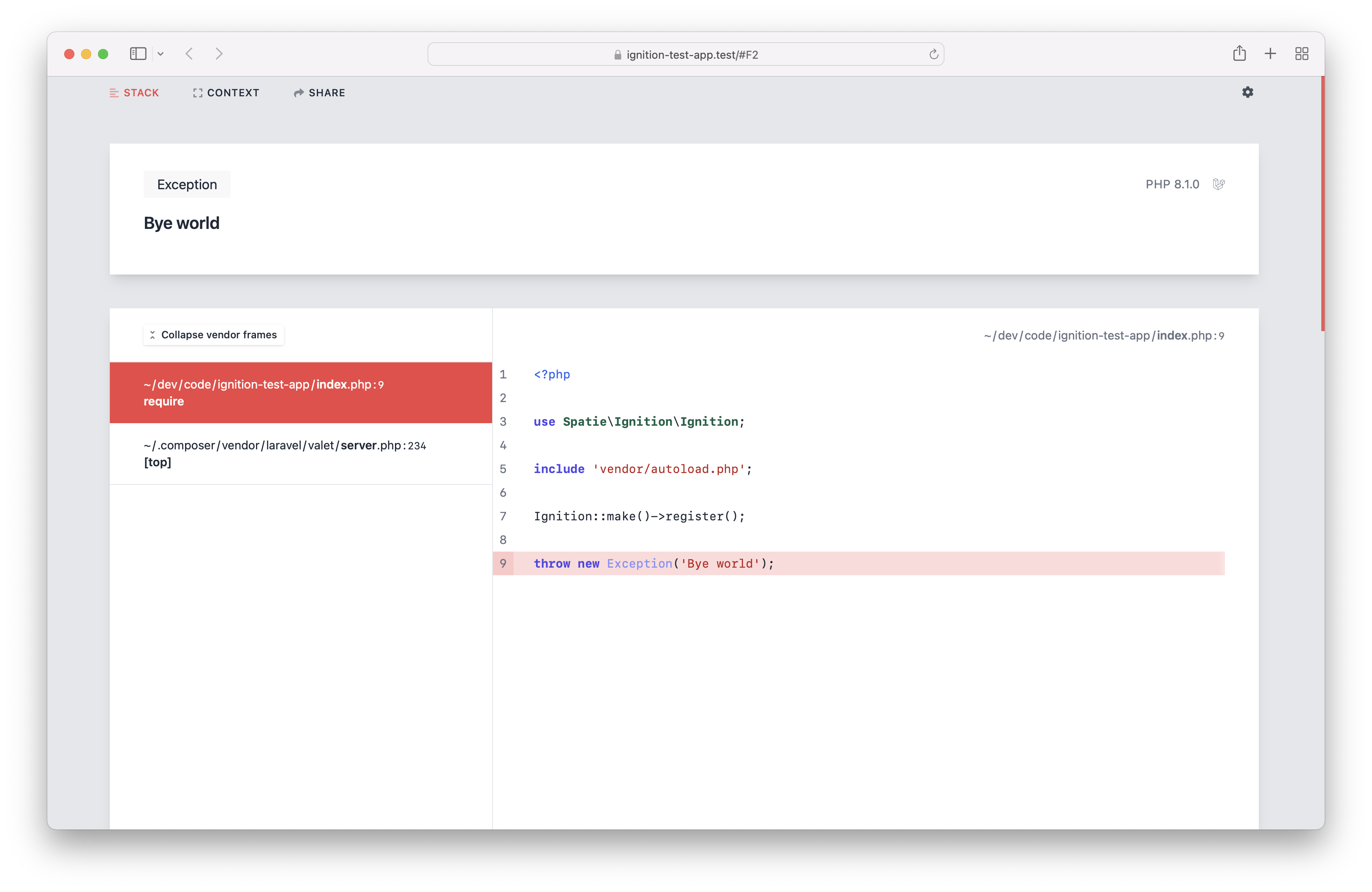
Let's now throw an exception during a web request.
|
|
|
25 |
|
|
|
26 |
```php
|
|
|
27 |
throw new Exception('Bye world');
|
|
|
28 |
```
|
|
|
29 |
|
|
|
30 |
This is what you'll see in the browser.
|
|
|
31 |
|
|
|
32 |
|
|
|
33 |
|
|
|
34 |
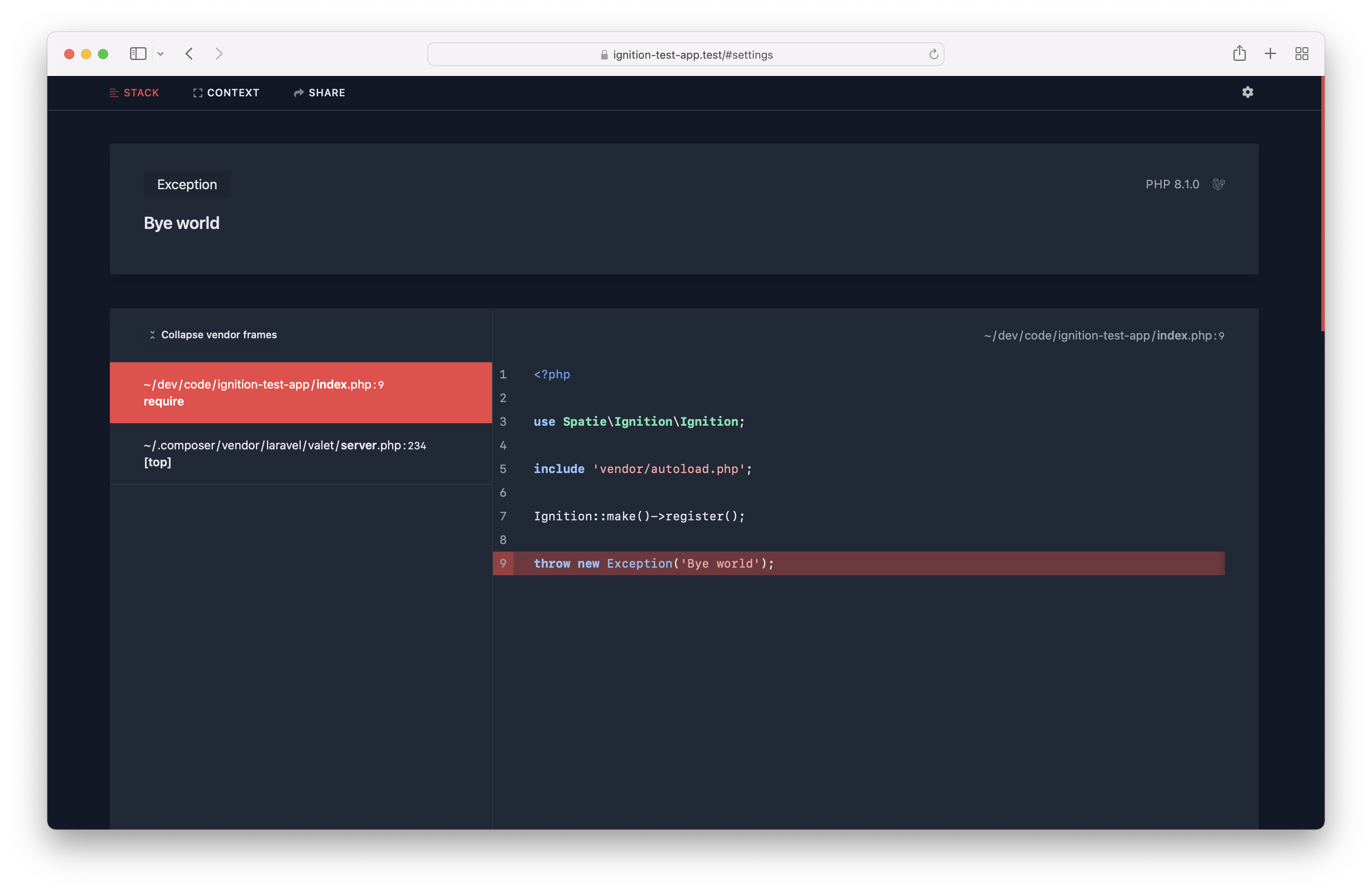
There's also a beautiful dark mode.
|
|
|
35 |
|
|
|
36 |
|
|
|
37 |
|
|
|
38 |
## Are you a visual learner?
|
|
|
39 |
|
|
|
40 |
In [this video on YouTube](https://youtu.be/LEY0N0Bteew?t=739), you'll see a demo of all of the features.
|
|
|
41 |
|
|
|
42 |
Do know more about the design decisions we made, read [this blog post](https://freek.dev/2168-ignition-the-most-beautiful-error-page-for-laravel-and-php-got-a-major-redesign).
|
|
|
43 |
|
|
|
44 |
## Support us
|
|
|
45 |
|
|
|
46 |
[<img src="https://github-ads.s3.eu-central-1.amazonaws.com/ignition.jpg?t=1" width="419px" />](https://spatie.be/github-ad-click/ignition)
|
|
|
47 |
|
|
|
48 |
We invest a lot of resources into creating [best in class open source packages](https://spatie.be/open-source). You can
|
|
|
49 |
support us by [buying one of our paid products](https://spatie.be/open-source/support-us).
|
|
|
50 |
|
|
|
51 |
We highly appreciate you sending us a postcard from your hometown, mentioning which of our package(s) you are using.
|
|
|
52 |
You'll find our address on [our contact page](https://spatie.be/about-us). We publish all received postcards
|
|
|
53 |
on [our virtual postcard wall](https://spatie.be/open-source/postcards).
|
|
|
54 |
|
|
|
55 |
## Installation
|
|
|
56 |
|
|
|
57 |
For Laravel apps, head over to [laravel-ignition](https://github.com/spatie/laravel-ignition).
|
|
|
58 |
|
|
|
59 |
For Symfony apps, go to [symfony-ignition-bundle](https://github.com/spatie/symfony-ignition-bundle).
|
|
|
60 |
|
|
|
61 |
For all other PHP projects, install the package via composer:
|
|
|
62 |
|
|
|
63 |
```bash
|
|
|
64 |
composer require spatie/ignition
|
|
|
65 |
```
|
|
|
66 |
|
|
|
67 |
## Usage
|
|
|
68 |
|
|
|
69 |
In order to display the Ignition error page when an error occurs in your project, you must add this code. Typically, this would be done in the bootstrap part of your application.
|
|
|
70 |
|
|
|
71 |
```php
|
|
|
72 |
\Spatie\Ignition\Ignition::make()->register();
|
|
|
73 |
```
|
|
|
74 |
|
|
|
75 |
### Setting the application path
|
|
|
76 |
|
|
|
77 |
When setting the application path, Ignition will trim the given value from all paths. This will make the error page look
|
|
|
78 |
more cleaner.
|
|
|
79 |
|
|
|
80 |
```php
|
|
|
81 |
\Spatie\Ignition\Ignition::make()
|
|
|
82 |
->applicationPath($basePathOfYourApplication)
|
|
|
83 |
->register();
|
|
|
84 |
```
|
|
|
85 |
|
|
|
86 |
### Using dark mode
|
|
|
87 |
|
|
|
88 |
By default, Ignition uses a nice white based theme. If this is too bright for your eyes, you can use dark mode.
|
|
|
89 |
|
|
|
90 |
```php
|
|
|
91 |
\Spatie\Ignition\Ignition::make()
|
|
|
92 |
->useDarkMode()
|
|
|
93 |
->register();
|
|
|
94 |
```
|
|
|
95 |
|
|
|
96 |
### Avoid rendering Ignition in a production environment
|
|
|
97 |
|
|
|
98 |
You don't want to render the Ignition error page in a production environment, as it potentially can display sensitive
|
|
|
99 |
information.
|
|
|
100 |
|
|
|
101 |
To avoid rendering Ignition, you can call `shouldDisplayException` and pass it a falsy value.
|
|
|
102 |
|
|
|
103 |
```php
|
|
|
104 |
\Spatie\Ignition\Ignition::make()
|
|
|
105 |
->shouldDisplayException($inLocalEnvironment)
|
|
|
106 |
->register();
|
|
|
107 |
```
|
|
|
108 |
|
|
|
109 |
### Displaying solutions
|
|
|
110 |
|
|
|
111 |
In addition to displaying an exception, Ignition can display a solution as well.
|
|
|
112 |
|
|
|
113 |
Out of the box, Ignition will display solutions for common errors such as bad methods calls, or using undefined
|
|
|
114 |
properties.
|
|
|
115 |
|
|
|
116 |
#### Adding a solution directly to an exception
|
|
|
117 |
|
|
|
118 |
To add a solution text to your exception, let the exception implement the `Spatie\Ignition\Contracts\ProvidesSolution`
|
|
|
119 |
interface.
|
|
|
120 |
|
|
|
121 |
This interface requires you to implement one method, which is going to return the `Solution` that users will see when
|
|
|
122 |
the exception gets thrown.
|
|
|
123 |
|
|
|
124 |
```php
|
|
|
125 |
use Spatie\Ignition\Contracts\Solution;
|
|
|
126 |
use Spatie\Ignition\Contracts\ProvidesSolution;
|
|
|
127 |
|
|
|
128 |
class CustomException extends Exception implements ProvidesSolution
|
|
|
129 |
{
|
|
|
130 |
public function getSolution(): Solution
|
|
|
131 |
{
|
|
|
132 |
return new CustomSolution();
|
|
|
133 |
}
|
|
|
134 |
}
|
|
|
135 |
```
|
|
|
136 |
|
|
|
137 |
```php
|
|
|
138 |
use Spatie\Ignition\Contracts\Solution;
|
|
|
139 |
|
|
|
140 |
class CustomSolution implements Solution
|
|
|
141 |
{
|
|
|
142 |
public function getSolutionTitle(): string
|
|
|
143 |
{
|
|
|
144 |
return 'The solution title goes here';
|
|
|
145 |
}
|
|
|
146 |
|
|
|
147 |
public function getSolutionDescription(): string
|
|
|
148 |
{
|
|
|
149 |
return 'This is a longer description of the solution that you want to show.';
|
|
|
150 |
}
|
|
|
151 |
|
|
|
152 |
public function getDocumentationLinks(): array
|
|
|
153 |
{
|
|
|
154 |
return [
|
|
|
155 |
'Your documentation' => 'https://your-project.com/relevant-docs-page',
|
|
|
156 |
];
|
|
|
157 |
}
|
|
|
158 |
}
|
|
|
159 |
```
|
|
|
160 |
|
|
|
161 |
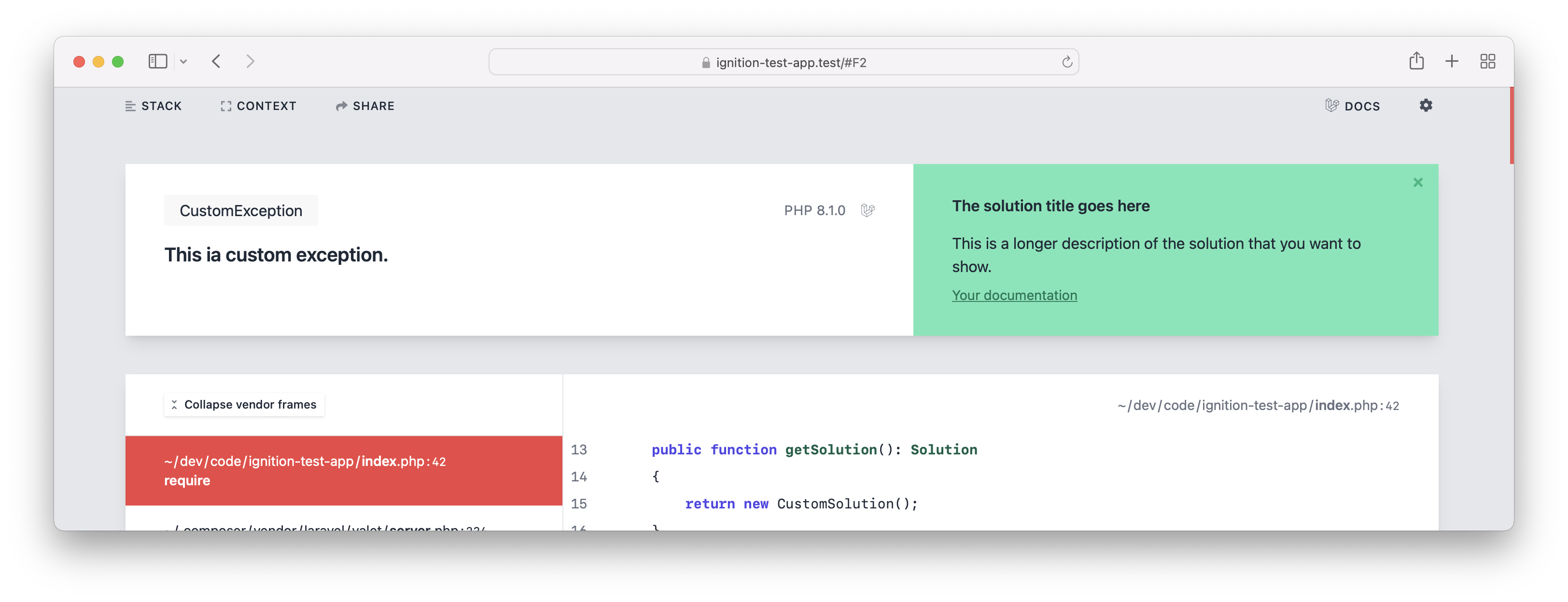
This is how the exception would be displayed if you were to throw it.
|
|
|
162 |
|
|
|
163 |
|
|
|
164 |
|
|
|
165 |
#### Using solution providers
|
|
|
166 |
|
|
|
167 |
Instead of adding solutions to exceptions directly, you can also create a solution provider. While exceptions that
|
|
|
168 |
return a solution, provide the solution directly to Ignition, a solution provider allows you to figure out if an
|
|
|
169 |
exception can be solved.
|
|
|
170 |
|
|
|
171 |
For example, you could create a custom "Stack Overflow solution provider", that will look up if a solution can be found
|
|
|
172 |
for a given throwable.
|
|
|
173 |
|
|
|
174 |
Solution providers can be added by third party packages or within your own application.
|
|
|
175 |
|
|
|
176 |
A solution provider is any class that implements the \Spatie\Ignition\Contracts\HasSolutionsForThrowable interface.
|
|
|
177 |
|
|
|
178 |
This is how the interface looks like:
|
|
|
179 |
|
|
|
180 |
```php
|
|
|
181 |
interface HasSolutionsForThrowable
|
|
|
182 |
{
|
|
|
183 |
public function canSolve(Throwable $throwable): bool;
|
|
|
184 |
|
|
|
185 |
/** @return \Spatie\Ignition\Contracts\Solution[] */
|
|
|
186 |
public function getSolutions(Throwable $throwable): array;
|
|
|
187 |
}
|
|
|
188 |
```
|
|
|
189 |
|
|
|
190 |
When an error occurs in your app, the class will receive the `Throwable` in the `canSolve` method. In that method you
|
|
|
191 |
can decide if your solution provider is applicable to the `Throwable` passed. If you return `true`, `getSolutions` will
|
|
|
192 |
get called.
|
|
|
193 |
|
|
|
194 |
To register a solution provider to Ignition you must call the `addSolutionProviders` method.
|
|
|
195 |
|
|
|
196 |
```php
|
|
|
197 |
\Spatie\Ignition\Ignition::make()
|
|
|
198 |
->addSolutionProviders([
|
|
|
199 |
YourSolutionProvider::class,
|
|
|
200 |
AnotherSolutionProvider::class,
|
|
|
201 |
])
|
|
|
202 |
->register();
|
|
|
203 |
```
|
|
|
204 |
|
|
|
205 |
### Sending exceptions to Flare
|
|
|
206 |
|
|
|
207 |
Ignition comes with the ability to send exceptions to [Flare](https://flareapp.io), an exception monitoring service. Flare
|
|
|
208 |
can notify you when new exceptions are occurring in your production environment.
|
|
|
209 |
|
|
|
210 |
To send exceptions to Flare, simply call the `sendToFlareMethod` and pass it the API key you got when creating a project
|
|
|
211 |
on Flare.
|
|
|
212 |
|
|
|
213 |
You probably want to combine this with calling `runningInProductionEnvironment`. That method will, when passed a truthy
|
|
|
214 |
value, not display the Ignition error page, but only send the exception to Flare.
|
|
|
215 |
|
|
|
216 |
```php
|
|
|
217 |
\Spatie\Ignition\Ignition::make()
|
|
|
218 |
->runningInProductionEnvironment($boolean)
|
|
|
219 |
->sendToFlare($yourApiKey)
|
|
|
220 |
->register();
|
|
|
221 |
```
|
|
|
222 |
|
|
|
223 |
When you pass a falsy value to `runningInProductionEnvironment`, the Ignition error page will get shown, but no
|
|
|
224 |
exceptions will be sent to Flare.
|
|
|
225 |
|
|
|
226 |
### Sending custom context to Flare
|
|
|
227 |
|
|
|
228 |
When you send an error to Flare, you can add custom information that will be sent along with every exception that
|
|
|
229 |
happens in your application. This can be very useful if you want to provide key-value related information that
|
|
|
230 |
furthermore helps you to debug a possible exception.
|
|
|
231 |
|
|
|
232 |
```php
|
|
|
233 |
use Spatie\FlareClient\Flare;
|
|
|
234 |
|
|
|
235 |
\Spatie\Ignition\Ignition::make()
|
|
|
236 |
->runningInProductionEnvironment($boolean)
|
|
|
237 |
->sendToFlare($yourApiKey)
|
|
|
238 |
->configureFlare(function(Flare $flare) {
|
|
|
239 |
$flare->context('Tenant', 'My-Tenant-Identifier');
|
|
|
240 |
})
|
|
|
241 |
->register();
|
|
|
242 |
```
|
|
|
243 |
|
|
|
244 |
Sometimes you may want to group your context items by a key that you provide to have an easier visual differentiation
|
|
|
245 |
when you look at your custom context items.
|
|
|
246 |
|
|
|
247 |
The Flare client allows you to also provide your own custom context groups like this:
|
|
|
248 |
|
|
|
249 |
```php
|
|
|
250 |
use Spatie\FlareClient\Flare;
|
|
|
251 |
|
|
|
252 |
\Spatie\Ignition\Ignition::make()
|
|
|
253 |
->runningInProductionEnvironment($boolean)
|
|
|
254 |
->sendToFlare($yourApiKey)
|
|
|
255 |
->configureFlare(function(Flare $flare) {
|
|
|
256 |
$flare->group('Custom information', [
|
|
|
257 |
'key' => 'value',
|
|
|
258 |
'another key' => 'another value',
|
|
|
259 |
]);
|
|
|
260 |
})
|
|
|
261 |
->register();
|
|
|
262 |
```
|
|
|
263 |
|
|
|
264 |
### Anonymize request to Flare
|
|
|
265 |
|
|
|
266 |
By default, the Ignition collects information about the IP address of your application users. If you don't want to send this information to Flare, call `anonymizeIp()`.
|
|
|
267 |
|
|
|
268 |
```php
|
|
|
269 |
use Spatie\FlareClient\Flare;
|
|
|
270 |
|
|
|
271 |
\Spatie\Ignition\Ignition::make()
|
|
|
272 |
->runningInProductionEnvironment($boolean)
|
|
|
273 |
->sendToFlare($yourApiKey)
|
|
|
274 |
->configureFlare(function(Flare $flare) {
|
|
|
275 |
$flare->anonymizeIp();
|
|
|
276 |
})
|
|
|
277 |
->register();
|
|
|
278 |
```
|
|
|
279 |
|
|
|
280 |
### Censoring request body fields
|
|
|
281 |
|
|
|
282 |
When an exception occurs in a web request, the Flare client will pass on any request fields that are present in the body.
|
|
|
283 |
|
|
|
284 |
In some cases, such as a login page, these request fields may contain a password that you don't want to send to Flare.
|
|
|
285 |
|
|
|
286 |
To censor out values of certain fields, you can use `censorRequestBodyFields`. You should pass it the names of the fields you wish to censor.
|
|
|
287 |
|
|
|
288 |
```php
|
|
|
289 |
use Spatie\FlareClient\Flare;
|
|
|
290 |
|
|
|
291 |
\Spatie\Ignition\Ignition::make()
|
|
|
292 |
->runningInProductionEnvironment($boolean)
|
|
|
293 |
->sendToFlare($yourApiKey)
|
|
|
294 |
->configureFlare(function(Flare $flare) {
|
|
|
295 |
$flare->censorRequestBodyFields(['password']);
|
|
|
296 |
})
|
|
|
297 |
->register();
|
|
|
298 |
```
|
|
|
299 |
|
|
|
300 |
This will replace the value of any sent fields named "password" with the value "<CENSORED>".
|
|
|
301 |
|
|
|
302 |
### Using middleware to modify data sent to Flare
|
|
|
303 |
|
|
|
304 |
Before Flare receives the data that was collected from your local exception, we give you the ability to call custom middleware methods. These methods retrieve the report that should be sent to Flare and allow you to add custom information to that report.
|
|
|
305 |
|
|
|
306 |
A valid middleware is any class that implements `FlareMiddleware`.
|
|
|
307 |
|
|
|
308 |
```php
|
|
|
309 |
use Spatie\FlareClient\Report;
|
|
|
310 |
|
|
|
311 |
use Spatie\FlareClient\FlareMiddleware\FlareMiddleware;
|
|
|
312 |
|
|
|
313 |
class MyMiddleware implements FlareMiddleware
|
|
|
314 |
{
|
|
|
315 |
public function handle(Report $report, Closure $next)
|
|
|
316 |
{
|
|
|
317 |
$report->message("{$report->getMessage()}, now modified");
|
|
|
318 |
|
|
|
319 |
return $next($report);
|
|
|
320 |
}
|
|
|
321 |
}
|
|
|
322 |
```
|
|
|
323 |
|
|
|
324 |
```php
|
|
|
325 |
use Spatie\FlareClient\Flare;
|
|
|
326 |
|
|
|
327 |
\Spatie\Ignition\Ignition::make()
|
|
|
328 |
->runningInProductionEnvironment($boolean)
|
|
|
329 |
->sendToFlare($yourApiKey)
|
|
|
330 |
->configureFlare(function(Flare $flare) {
|
|
|
331 |
$flare->registerMiddleware([
|
|
|
332 |
MyMiddleware::class,
|
|
|
333 |
])
|
|
|
334 |
})
|
|
|
335 |
->register();
|
|
|
336 |
```
|
|
|
337 |
|
|
|
338 |
### Changelog
|
|
|
339 |
|
|
|
340 |
Please see [CHANGELOG](CHANGELOG.md) for more information about what has changed recently.
|
|
|
341 |
|
|
|
342 |
## Contributing
|
|
|
343 |
|
|
|
344 |
Please see [CONTRIBUTING](https://github.com/spatie/.github/blob/main/CONTRIBUTING.md) for details.
|
|
|
345 |
|
|
|
346 |
## Dev setup
|
|
|
347 |
|
|
|
348 |
Here are the steps you'll need to perform if you want to work on the UI of Ignition.
|
|
|
349 |
|
|
|
350 |
- clone (or move) `spatie/ignition`, `spatie/ignition-ui`, `spatie/laravel-ignition`, `spatie/flare-client-php` and `spatie/ignition-test` into the same directory (e.g. `~/code/flare`)
|
|
|
351 |
- create a new `package.json` file in `~/code/flare` directory:
|
|
|
352 |
```json
|
|
|
353 |
{
|
|
|
354 |
"private": true,
|
|
|
355 |
"workspaces": [
|
|
|
356 |
"ignition-ui",
|
|
|
357 |
"ignition"
|
|
|
358 |
]
|
|
|
359 |
}
|
|
|
360 |
```
|
|
|
361 |
- run `yarn install` in the `~/code/flare` directory
|
|
|
362 |
- in the `~/code/flare/ignition-test` directory
|
|
|
363 |
- run `composer update`
|
|
|
364 |
- run `cp .env.example .env`
|
|
|
365 |
- run `php artisan key:generate`
|
|
|
366 |
- http://ignition-test.test/ should now work (= show the new UI). If you use valet, you might want to run `valet park` inside the `~/code/flare` directory.
|
|
|
367 |
- http://ignition-test.test/ has a bit of everything
|
|
|
368 |
- http://ignition-test.test/sql-error has a solution and SQL exception
|
|
|
369 |
|
|
|
370 |
## Security Vulnerabilities
|
|
|
371 |
|
|
|
372 |
Please review [our security policy](../../security/policy) on how to report security vulnerabilities.
|
|
|
373 |
|
|
|
374 |
## Credits
|
|
|
375 |
|
|
|
376 |
- [Spatie](https://spatie.be)
|
|
|
377 |
- [All Contributors](../../contributors)
|
|
|
378 |
|
|
|
379 |
## License
|
|
|
380 |
|
|
|
381 |
The MIT License (MIT). Please see [License File](LICENSE.md) for more information.
|